Cookies enable the best possible provision of our services. By using our site, you agree that cookies will be used.
AI Assistant for pirobase Editor and Webadmin
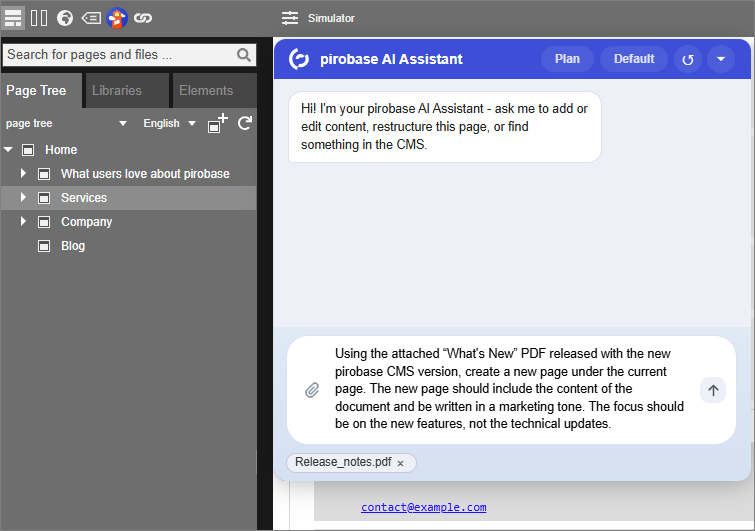
The pirobase AI Assistant is a chat-based assistant built directly into the pirobase Editor and the Webadmin.
Editors and administrators describe in natural language what needs to be done.
The assistant carries out the matching CMS actions on its own.
What the assistant can do
- Create, edit and publish pages and content elements
- Rewrite, translate or rephrase existing content
- Copy, move and lock pages and set their visibility for groups and users
- Evaluate attached images, PDF, Word and Excel files and, if needed, add them to the page as a file
- Create a new page from an attached document at the desired position in the page tree, compare a page with a document or combine several pages into one
- Upload images and files to the library and fill image and file fields
- Suggest, fill in and validate schema markup (JSON-LD)
- Check a page before publishing, test its accessibility with Lighthouse and restore an earlier version
- Manage users, groups and permissions (Webadmin)
- Open the right menu item in the Webadmin, such as user management or layouts, without having to look for it in the menu
- Look up, create and adjust templates, element types and configuration entries
- Start, stop and configure layouts and sites and create library data sources (Webadmin)
Before an action with side effects is carried out, the assistant asks for confirmation.
The default is Plan mode, in which it presents all steps together as a plan.
In Manual mode it asks for each step separately, in Auto mode only before actions such as deleting a page or a user.
An independent verification step then checks whether the action was actually carried out as described.
The assistant is switched off on delivery.
It is enabled in the system configuration, and only users with the corresponding right can use it.
Out of the box, only the System Administrator role has this right.
Besides the chat in the CMS, the assistant can also be used from outside, for example from Claude Code.
An external MCP client then gets the same tools through a relay on the user's computer.
The administrator grants this access per community and per user account.
Architecture
The assistant runs as an MCP tool (Model Context Protocol) hosted on Azure.
For this tool to actually carry out CMS actions in the browser, an additional connection component is required that runs as a separate service: the WebMCP Bridge.
It mediates between the browser and the Azure service.
External link
Login required